REVIEWS

Monday, 4 May 2015

How to play GTA5 with minimum stutter on a low end pc.


It’s finally here. GTA 5 on PC! . PC gamer have desperately waited for this moment for quite some time now. The wait was worth it as Rockstar have really optimized the game to run on almost any modest PC. Say you got your hands on the game but don’t have gaming PCwith monster specs and the gaming experience is not that smooth. This blog will help you get that extra fps. I was able to obtain a max of 32 fps on my PC. The blog is written considering a Nvidia graphic card, though 'similar' steps can be followed for an ATI card.

 My PC specs are as follows
Intel core 2duo e7500 @ 2.93GHz
Zotac Nvidia GT 630 2GB DDR3 ZONE EDITION.
4GB RAM.
WIN 7 64bit.
If you have more memory (RAM) and a better CPU, the results will impressive.The first thing to get max performance is optimization, freeing up system resources and then provide efficient hardware cooling.


Optimization and freeing up resources: 


The first step in optimization process it to make sure your graphic drivers are up to date. Before updating, uninstall the previous version of the driver completely.

For this,

  • Boot into safe mode (Hit F8 before you see the windows logo on booting up your PC. It’s that easy). Then uninstall the driver from the control panel and reboot you PC.
  • Wait for windows to finish the ‘display driver’ installation. When prompted, restart windows and then (ONLY THEN) install the latest drivers.
Nvidia GeforceExperience is an excellent tool to get the optimal settings for a game, but we will optimize all the setting manually so uninstalling this utility will free up some more resources. So, while installing the latest drivers, choose ‘Advanced’ and then remove all other components. After the installation is complete, restart your PC.


One more step before you double click ‘GTA-5.exe’(or 3DMlauncher.exe ).
Right click on the desktop and open ‘Nvidia Contol Panel’.
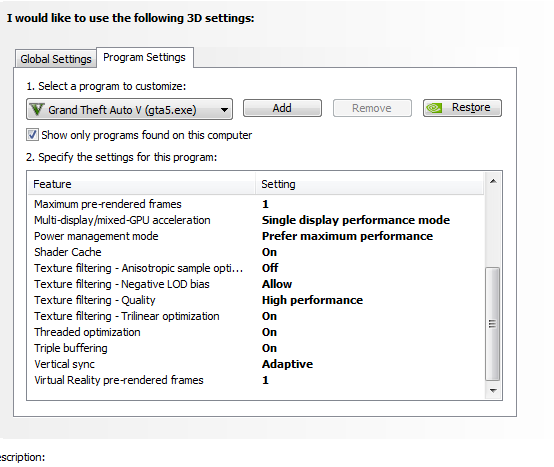
Select ‘Manage 3D settings’ and under the ‘Program Settings’ tab, select ‘GTA5.exe’ in the drop down menu and apply the following settings shown in the screenshot below.


After making changes, hit on save. Now open ‘Adjust the appearance and performance of windows’ (where to find this? Use windows search.), and select ‘Adjust for best performance’ under the visual effects tab.


Some more tips.
Disabling some of the windows services:
Go  to start> type ‘run’> type ‘services.msc’> disable all the unwanted services
Killing background applications that are not required  from the task manager.


Over the years, your CPU and GPU will have sucked in a lot of dust, reducing the heat radiating capacity. For better cooling,

  • Clean the CPU and GPU heatsink and fan.
  • Change the CPU thermal paste.  
 
 
 These steps will definitely help you have a better GTA 5 experience.
If you have any suggestions or questions, please feel free comment in the comments section below.


Thursday, 19 March 2015

Android One lollipop update. Better late than never, because never was not an option.


Android One users in India have waited for months for this day. Every rumor  gave then hope and fueled their frustration when they realized that those rumors were not true. I dare say that Google 'trolled' by saying that the update will begin 'soon'.
But finally that day has come and the 5.1 updates have started rolling out. Android One phones were appreciated for their clutter free 'stock'  experience. Hopefully Google has fixed all the issues with the not so sweet 5.0 and made 5.1 sweeter than Kitkat on Android One.


The OTA update with a build number  LMY470 is about 409 MB. If you cant wait for the ota like me, download the ota zip file which an  xda member had captured and install it by..
  1. Copy the ota zip file to your phone.
  2. Power off device.
  3. Boot into recovery.
  4. Choose install zip from SD card.
  5. Then choose the zip file.
  6. Wait till the update finishes.
  7. When promted ,select reboot system now
  8. Now you are 5.1!!
Please be patient for the first boot as it will take about 10-15 min depending on the number of apps you have installed on your phone.

Tuesday, 3 February 2015

Micromax Canvas A1 Lollipop update to roll out soon

Android One was Google's mega strategy to reach 'the next billion' people. To achieve this it had to target the 'mass market' and the take on the biggest challenge of combining 'affordability' with 'latest technology'. The most unique feature of these phones is that Google itself handles the OS updates.


Months have passed since Lollipop was officially announced and started rolling out to the Nexus family, but there is no official word from Google as to when Android One devices will get the 5.0 update. This may be because Lollipop is still buggy and  major OEM's have also delayed the update. Htc who promised Lollipop update on all of its phones within 90 days of the software’s availability from Google issued a  statement on the company’s website
“We’ve been working hard in the labs with Google and our carrier partners ever since the code release and are making great progress so far, but if you’ve been following the progress of this rollout you will know that Google has had to address several issues with this release. We’ve been diligently working to fix some of them on our end and incorporating Google’s fixes as quickly as possible, but despite everyone’s best efforts some carrier versions of the HTC One (M8) and HTC One (M7) will not meet our 90 day goal, which is February 1st."
But there is some good news to all Micromax Android Canvas A1 users. In response to a comment on Google plus post Micromax Mobile replied that Lollipop update might be rolled out soon. Though the post didn't give a specific date for the update.

  Since Google handle the software updates, we can assume that the time frame will be the same for the other two Android One phones also. Some posts on other websites indicate that the update is expected around Feb 25th. 
UPDATE:Google confirms the 5.0 (5.1 is expected as Android One devices launched for Indonesia run 5.1 run out of the box) update for Android One.Android One users in India — you'll be getting the Lollipop update in the next few weeks. @androidone


Saturday, 29 November 2014

One plus faces the first blow from mircomax

Some annoucements create a lot to hype and excitement in the market. In India, there were two such announcements should have created such a hype, But no one expected that those two announcemets would fight each other to create a bigger one.
The first one was that Indians would officially be able to get their hands on the 'Flagship Killer'. The second one was Micromax's announcement of its new brand -'YU'. But they had something in common to keep the consumers more exited and that was ...CyanogenMod. Cyanogen popular among advanced users for its Custom Roms for android phones that offer extreme personalization options to change nearly all components of the mobile user interface, including wallpapers, icons, fonts, boot animations, and controls. Cyanogen also  announced its upcoming Themes app that will act like a store  for Cyanogen OS users to browse and download free and paid themes. Since the hardware if made by Micromax , prices are expected to be affordable.


OnePlus also ran on the CyanogenMod 11S and is expected to get the lollipop update soon globally.
But what was a big blow to One plus was that Cyanogen's exclusive partnership with Micromax meant that they would not  provide support any other devices shipping in India, which meant that the One Plus users in India would not be able to get a taste of Lollipop on their One Plus One. However One Plus was quick to respond to the news in a blog post -' A letter to our Indian users' saying that " It is truly unfortunate that a commitment we both made to our Indian users will now not be upheld.". But
this should not be a problem to advanced users as they can easily install ROMs from other Android development sites like XDA developers and not get caught in the fight to conquer. Since the demand for the One was mainly for the package at a very affordable price, users who want not just the hardware but the software as well might shy away from buying the device. This means lesser demand and hence it might be a little bit easier to get a phone (Atleast the invite) that is already very very difficult to get.
Its clear that Micromax is poised to grow and dominate the market once ruled by Samsung and Nokia with such tie ups.

Tuesday, 23 September 2014

Micromax Canvas A1 : The Nexus between performance and price.


During the Google I/O this year Sundar Pichai, the senior vice president at Google said "I am used to cutting edge phones and I have been using this one for a while and its really good". Android one is Google's mega strategy to take over the world of information.To achieve this they had to target the 'mass market' and the take on the biggest challege of combining 'affordability' with 'latest technology'.
Micromax Canvas A1 was one among the new breed of smartphones created  to achieve this purpose.
Since this phone is more about how Google intended to combine hardware and software, my review is divided into hardware and software and find out how much they were successful.


Hardware: 

It seems that Google and Micromax have drawn a lot of  inspiration from the current Nexus 5 while designing this phone. The phone is well built with a rubberised type back which feels really good while holding the phone. The front bears the FWGA IPS 4.5 inch screen with a resolution of 480 x 854 pixels. The lower resolution  with a larger screen size gives it a decent pixel density of about 217 ppi which is decent. Color reproduction is not the best with darks more like greys but the ambient light sensor makes sure that you don't struggle when under direct sunlight.One thing worth mentioning about is  the excellent sensitivity of the screen. The lack of  Gorilla Glass means that you have to be extra careful about the Canvas A1.


Unboxing
Under the hood, the Canvas A1 is powered by a Mediatek MT6582 which is a Quad-core Cortex-A7 CPU clocked at 1.3 GHz. Coupled with 1 GB RAM and Mali-400 GPU, performance in one word can be described as 'snappy and fluid'. Launching apps to minor and somewhat major multitasking everything  just works  pleasantly in harmony with vanilla Android. Heavy games like Asphat 8, GTA3,GTA vice city and sanandreas ran without any lag or frame drop. Which is very impressive considering the price .Out of the 4GB of onboard storage you have access to about 2.1 GB with storage expandable upto 32GB via a micro SD card.


Free ram available
storage


The 5Mp shooter on the back may not be an excellent performer but not a disappointment like the one on the Moto E. Under well light conditions, the photos are impressive considering the price.With the Google camera application you get features like motion blur, panorama, photosphere but controls are limited to turning ON/OFF HDR ,flash and manual exposure control. Video recording is possible at 1080p with the back and 720p with the front camera. The camera while recording faces the problem of focusing and produces videos that are shaky. The front 2Mp camera is just enough for video calls with average performance in well lit conditions.The single loud speaker on the back is loud enough but will not compete with you dock in loudness. Connectivity features include everything from bluetooth 4.0, Wi-Fi 802.11 b/g/n  

,EDGE ,3G(21Mbps up /5.7Mbps dwn) to GPS except NFC and LTE. Sensors include gyro, proximity, light and magnetic .The battery  being a 1700mAh and powering a quad core CPU will last you just about a day's use under heavy usage.


Software:


'Always on the latest version of Android' is the catch phrase that is linked to everthing associated with Android One. So it's just like the Nexus and Play edition devices, where you are sure to have your phone running the latest version of Android. Out of the box, the phone runs 4.4.4 with Google Now (aka Google experience) launcher and all Google apps and few bloatware.


The Stock OS ensures smooth and fast performance. Stock Android is the best in terms of  aesthetics and is prettier and more intuitive to use than the Android skins that are created by most of the Chinese and Indian smartphone manufacturers .There are also region specific features in softwares like Search and translate. Some app settings are frustrating it requires you insert a memory card to just start clicking pictures. Also, the phone doesn't allow you to receive .apk file another phones.But there are ways around this and the phone will not let you down in any manner.
 

Micromax and Google will surely achieve the traction necessary to reach the next five billion people with the first generation of Android One devices. The promised  5.0-Lollipop update should bring a host of new features and make the Canvas 1 more interesting. With Google recomended hardware and timely and updates Android one at an affordable price, this phone is for those want the 'Nexus' experience at an affordable price.


Monday, 1 September 2014

How fix 'missing PSpice menu' in Capture Student (OrCad Capture 9.1)

SPICE (Simulated Program with Integrated Circuit Emphasis) is a  software that can be used to  simulate different circuits and can be used to perform various analysis of electrical and electronic circuits including time domain response, small signal frequency response, total power dissipation, determination of nodal voltages and branch current in a circuit, transient analysis, determination of operating point of transistors, etc. You will most likely use it if you are a geek or you need to as it is part of you school or college curriculum. The software is easy to install and easy to use, users on Windows 7 and 8 might run into compatibility issues and the 'Pspice menu' might be missing, not letting you to 'run'  and analyse the circuit. In this blog ,I will show you some of the ways of getting these problems fixed in some easy steps. I have assumed that you have installed PSpice (OrCad ver9.1).

Fix 1:
  •  Right click on the 'capture student' icon, then go to the 'compatibility tab'.
  • Check the 'Run this ...for' Check Box and select 'Windows2000' from the drop down list.
  • Check the  'Run this program as administrator' Check Box.
  • Hit on 'Apply' and then 'Ok'.
  • Run the program.
      This should fix the problem, if not try changing the compatibility mode to 'Win Xp SP1'.


        Fix 2:Please note that this fix will work only if all the steps mentioned in Fix 1 is applied. 


  • Open  the 'Capture Student' application.  
  • Now go to file>open>project.
  • Then navigate to the 'example.opj' project file located in the 'Examples'  folder in C*:\Program Files\OrCAD_Demo\PSpice\Capture_Samples\Anasim.
  • Now check whether the Pspice menu is present.
  • If yes, save the project and create a new project  before closing the example project.
  • The new project should have all the problems fixed.


Did this fix help you or do you have a better fix ?.Feel free to comment and share.